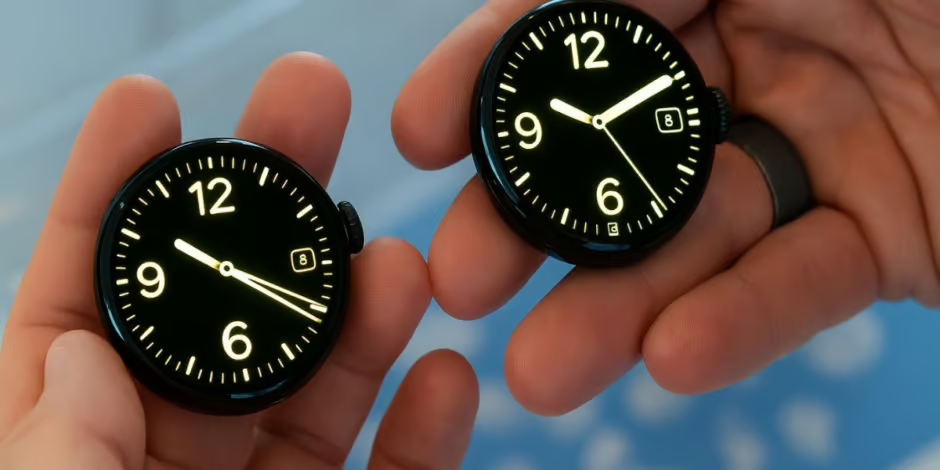
Recently, Google made a major change to its ecosystem: the Google Clock app — the one powering alarms, timers and stopwatches on wearables — is now exclusive to the Pixel Watch lineup. In other words: If you own a non-Pixel Wear OS smartwatch, you’ll no longer be able to download the Clock app from the Play Store, and if you already have it installed, you will not receive future updates. Android Authority+2mint+2
According to Google’s official support page, the decision was made because “your favourite watch brands offering their own default clock apps on Wear OS” — thus the Google Clock app will be “no longer available for download on Wear OS smartwatches — except for pre-installed on the Pixel Watch.” Digit+1
Hence, this change formally signals that the Clock app will become a “Pixel-only” feature going forward.
Who is Affected and What You Should Know
If you own a smartwatch that runs Wear OS but is not a Pixel Watch — for example a Samsung Galaxy Watch, a OnePlus Watch, or a watch from another manufacturer — then you need to be aware of the following:
- The Clock app will not appear in the Google Play Store listings for new installs on your device. Dataconomy+1
- If you already have the app installed, you may still use it, but you will not receive updates to the app. Android Authority+1
- Sideloading the app (installing from outside the Play Store) is technically possible in some cases, but Google indicates this method may not work properly, especially for features like phone-watch alarm syncing. Android Authority
- Meanwhile, if you are a Pixel Watch owner — nothing changes in practice for you: the Clock app remains available and will be updated as usual. mint
Thus, non-Pixel watch users should evaluate how reliant they are on the Google Clock app and plan accordingly.
The Rationale Behind Google’s Decision
At first glance, removing the Clock app’s availability for non-Pixel watches might seem arbitrary. However, several underlying motives may explain this move:
- Since many Wear OS smartwatch makers already include their own built-in clock, timer and alarm apps, Google may view its Clock app as duplicative on non-Pixel devices. Indeed, Google’s support wording points to this as the reason. mint+1
- By limiting the app to its own hardware ecosystem (Pixel Watch), Google can reduce the complexity and cost of supporting the app across many different hardware and software configurations. As noted, non-Pixel models frequently have different software layers and manufacturer customisations. Dataconomy+1
- It may also signal a broader strategic posture: certain “first-party” apps may become exclusive to Google’s own devices, reinforcing the Pixel ecosystem’s differentiation. Observers note similar moves (e.g., other apps/features) across Google’s portfolio. Android Authority
In short, while not explicitly stated by Google, it appears the move aligns with a strategy to streamline support and focus certain key experiences on its own hardware.
What It Means for Users & the Ecosystem
For end-users and the Wear OS ecosystem, the implications are noteworthy:
- Reduced uniformity across devices: Previously, one benefit of the Android/Wear OS ecosystem was that certain Google apps provided a consistent experience across devices from different brands. With this change, users may experience variation in core features like alarms, timers and stopwatch depending on device brand. mint
- Potential loss of updates: For non-Pixel users who already have the Google Clock app installed — you’re “grand-fathered” in, but you’ll be on a frozen version. That means no new features, bug-fixes or optimisations from Google.
- Reliance on manufacturer or third-party solutions: Non-Pixel watch owners will need to lean on the built-in clock/timer apps provided by the watch maker (Samsung, OnePlus, etc) or find alternative apps in the Play Store. Android Central
- Synchronicity concerns: Some users report issues when trying to sideload the Google Clock app — for example alarm syncing between phone & watch may fail. Thus, relying on side-install is not guaranteed to provide full functionality. Android Authority+1
Thus, it’s not just a technical change — it impacts user experience, choice and how the ecosystem functions.
What Should Non-Pixel Wear OS Watch Owners Do?
If you’re using a non-Pixel Wear OS watch (for instance a Galaxy Watch, OnePlus Watch or another brand), here are key steps you should take immediately:
- Check whether you currently have the Google Clock app installed. If yes, note whether it still functions as expected.
- Switch to the manufacturer’s clock/timer/alarm app if not already using it. Ensure it is set as default and that all your alarms and timers are working.
- Avoid relying on sideloading Google Clock — while possible, support is limited and future compatibility isn’t guaranteed.
- Check watch-to-phone alarm syncing (if you rely on it). If you find it broken or unreliable, consider alternatives or apps dedicated to your watch brand.
- Monitor announcements from your watch maker — they may release their own improved clock/timer app versions in response.
By taking these steps, you can ensure you maintain seamless alarm/timer functionality regardless of the Google Clock change.
Final Thoughts: A Shift in Wear OS Strategy
In conclusion, Google’s decision to end support for the Google Clock app on non-Pixel Wear OS watches marks a subtle yet significant shift in how the company treats its wearable ecosystem. On one hand, the move simplifies Google’s software burden and perhaps refines the Pixel experience. On the other hand, it reduces the uniformity and openness of Wear OS across multiple device brands.
While the average non-Pixel watch user may not feel immediate disruption — many watches already use their own clock/timer apps — the change reinforces a message: not all Google apps will be equally available across all hardware. For users who value cross-brand consistency, alarm/clock syncing, or rely on Google’s app for those functions, the implication is clear — you may need to adapt.
Ultimately, if you own a non-Pixel Wear OS watch, now is the time to review your clock/timer/alarm setup, ensure your routines remain reliable, and embrace the app ecosystem your watch maker supports. Meanwhile, Google appears to be focusing its wearable strategy on its own hardware ecosystem — a trend worth watching as Wear OS continues to evolve.