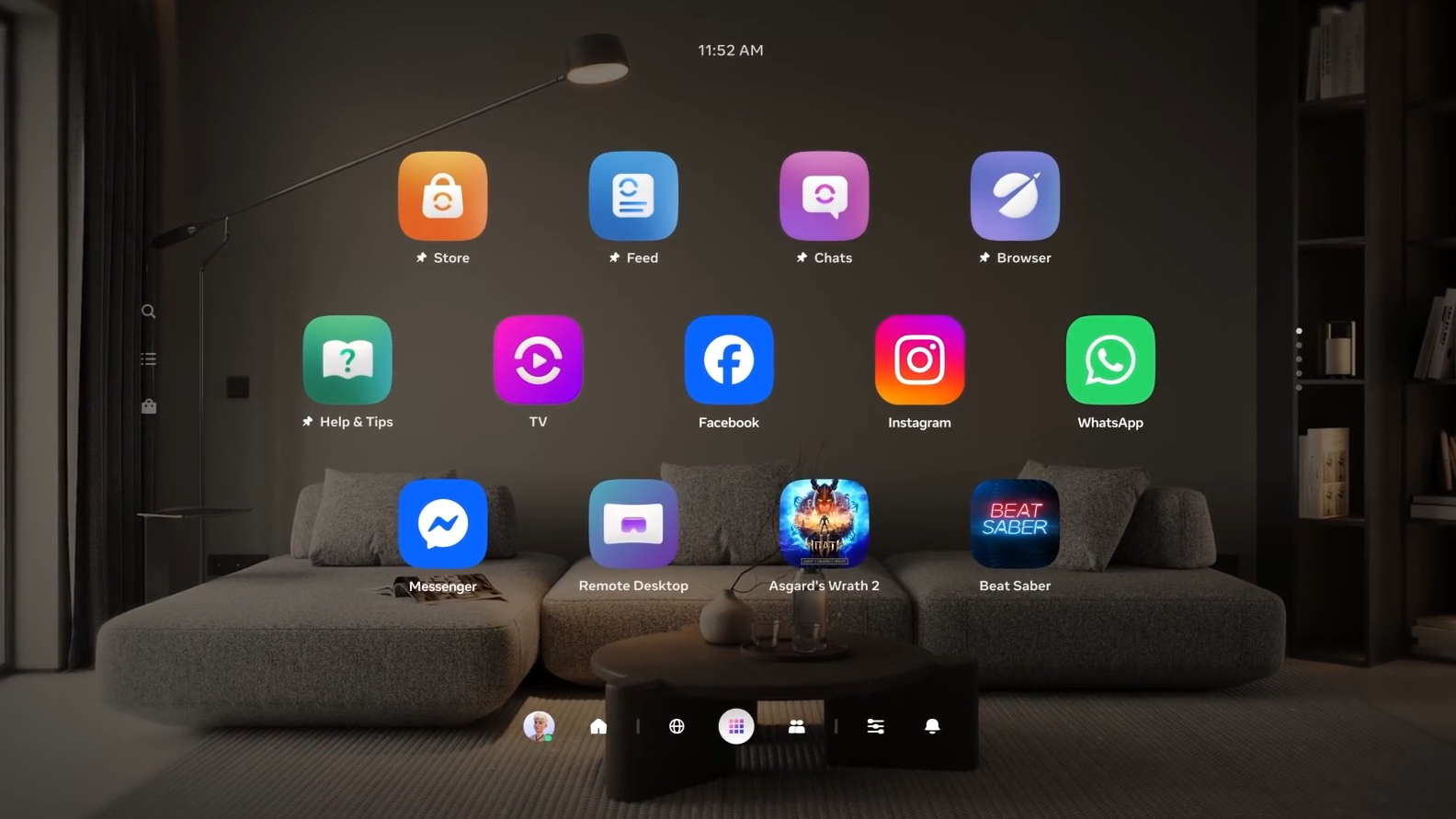
In the rapidly evolving world of virtual reality, changes at the system-level can dramatically alter how we interact with our devices. Recently, Meta unveiled the next evolution of its VR operating system for the Quest line with the Public Test Channel (PTC) release of Horizon OS v83. As announced, this version brings the redesigned “Navigator” system UI that Meta teased at its Connect event. UploadVR+2UploadVR+2
With this update, we see not only cosmetic changes, but also deeper functional improvements — meaning the Quest experience is moving into a more refined era of spatial computing.
What’s New: The Evolved Navigator UI
Firstly, let’s explore the big UI changes. The new Navigator overlay redesign moves away from the older floating menu structure and introduces a more integrated system interface. According to reports, key system panels — Library, Quick Settings, Notifications, Camera — now appear in a unified overlay rather than being treated as individual 2D windows. UploadVR+1
Specifically, Horizon OS v83 PTC includes:
- A new “Worlds” tab dedicated to Horizon Worlds destinations, so you no longer see those entries in your main app Library. UploadVR
- A “People” tab that surfaces friends and social shortcuts, along with a “You” tab displaying your avatar and status. UploadVR
- The Library now features interleaving offset rows, reminiscent of interfaces like visionOS. UploadVR
- A double-tap gesture on the Meta button or a hand-tracking gesture (thumb to index finger) to hide/show all 2D windows. UploadVR
Together, these transformations show a clear push toward making the Quest UI more intuitive, flexible and spatial.
Why These Changes Matter
Next, it’s important to understand why Meta is doing this. There are several reasons:
- Enhanced workflow: By consolidating system UI panels into one overlay, switching between apps, system settings and social features becomes faster and more consistent. For users who multitask in VR, this is a meaningful upgrade.
- Better immersion: The UI now dims the background instead of using a large opaque grey cloud that obscured virtual or passthrough environments. UploadVR+1 This means when you launch the overlay while immersed in your environment, you retain more spatial context.
- Social and spatial focus: By bringing friends, avatars and worlds to the forefront, Meta is emphasising the social dimension of its VR ecosystem — not just gaming but connection and presence.
Hence, this update isn’t merely cosmetic — it’s about aligning the OS with a future of blended reality experiences.
Scene Understanding & Spatial Upgrades
Beyond UI cosmetics, Horizon OS v83 PTC introduces improvements in spatial computing capabilities. For example, the “Space Setup” function now supports multi-height floors, slanted ceilings, and inner walls, meaning it can better map a user’s real environment for mixed reality experiences. UploadVR+1
In practice, this means more accurate passthrough and placement of virtual objects in your room. If you have architectural quirks like lofts or split‐level areas, the system is now better equipped to understand those. Meanwhile, developers gain access to a richer scene mesh and bounding boxes that can anchor content more naturally.
Thus, the update takes a major step toward more realistic, seamless mixed-reality experiences.
How to Access: PTC and What to Expect
If you’re interested in trying out these new features, you’ll want to enrol in the Public Test Channel (PTC). Since Horizon OS v83 is currently in PTC, it may not yet be widely available to all users and some features may still be experimental. UploadVR+1
Key things to keep in mind:
- Enrolment is done via your Meta account and device settings; availability may vary by region and headset model.
- PTC versions may contain bugs, and some features might never reach the full stable release. The release notes caution that “features in the eventual stable version may not be present in the PTC.” UploadVR
- If you opt in, be prepared for occasional resets or unavailability of some modules. If stability is your priority, you may want to wait for the official rollout.
In summary, trying the UI now gives early access — but also comes with trade-offs.
Implications for Developers and Users
From a broader perspective, the UI overhaul and spatial improvements have implications for both users and developers. For users: you’re getting a more polished interface and better environment awareness; for developers: there’s a richer platform to build experiences on.
For example:
- Developers can better anchor virtual windows or portals to real world geometry (inner walls, slanted ceilings).
- Social apps benefit from the “People” tab and new social UI hooks.
- Users can expect smoother multitasking, easier access to friends/worlds, and a more cohesive look and feel.
Consequently, this update could influence how VR apps are designed and how users think about immersive environments — shifting expectations upward.
Conclusion: The Road Ahead
In conclusion, Horizon OS v83 PTC marks an important milestone in the evolution of Meta’s Quest platform. With the redesigned Navigator UI, improved spatial understanding, and a renewed focus on social presence, Meta is laying the groundwork for the next chapter of VR and mixed reality. While some features are still in the test phase and rollout will be gradual, the direction is clear: more seamless, intuitive and spatially aware experiences.
If you own a Quest headset and are ready to experiment, enrolling in the PTC gives you a chance to glimpse this future. Otherwise, keeping an eye on the stable release will be worthwhile — because when the update arrives broadly, it may redefine how we navigate VR OS interfaces.
Ultimately, whether you’re a developer, social VR enthusiast or a casual user, the horizon (pun intended) looks promising. The key takeaway: the user interface isn’t just getting a facelift — it’s being re-imagined for a spatial, shared, immersive future.